Template Demo
The Template Demo is only there to give you an idea of the different styles available. It will not look exactly right until it is configured and the design and layout is in proportion with the content and images. Please consider this before discarding any design and layout.
To Change the Default Template Select one from the drop down list on the left or right navigation menu titled Template Demo and click Select.
Reset Cookies and Temporary Cache
This may be needed if you are unable to change the template and will default to the origional template.
Firstly go to internet explorer, then go to tools menu, and internet options…

STEP 1.
Then Click Delete Cookies
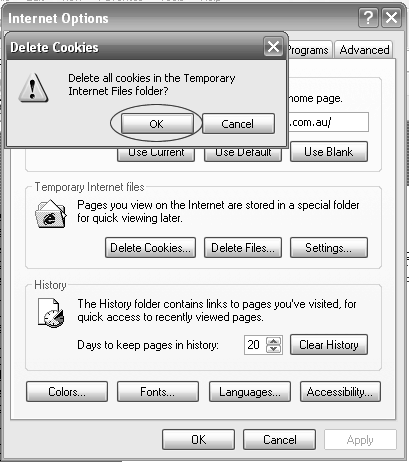
STEP 2.
Click OK to delete all cookies.
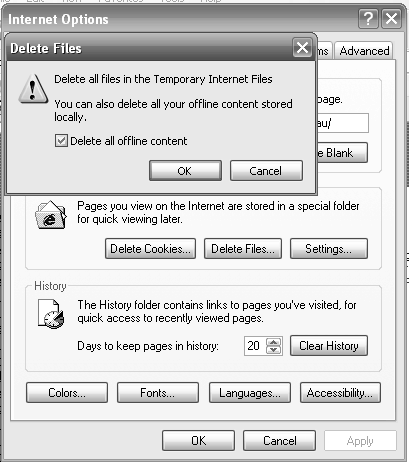
STEP 3.
Now Click Delete Files.
Now Click Delete All offline content Checkbox and Click OK.
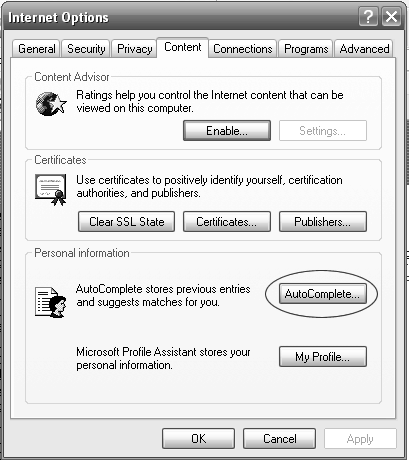
STEP 4.
Now Click Clear History
Now Click Yes to Delete History
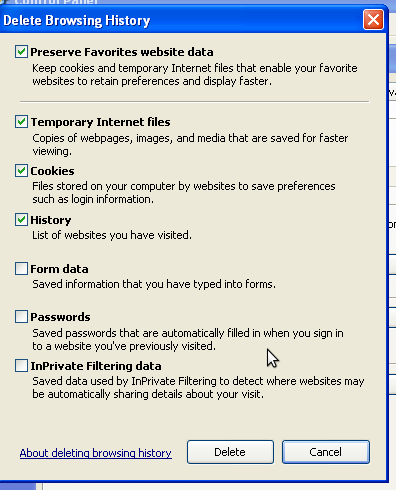
STEP 5.
Now click the Content Tab and then Click AutoComplete
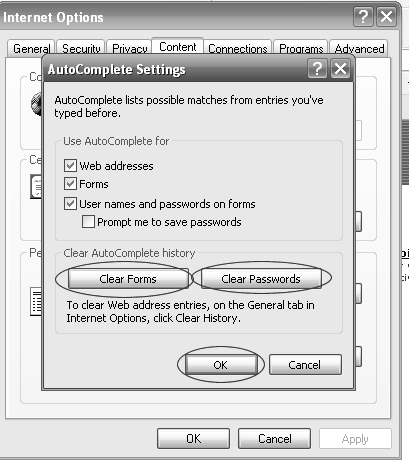
STEP 6.
Now Click Clear Forms to Delete All Form Data Saved on your Computer
Now Click Clear Passwords to Delete All Passwords.
***WARNING***
If you delete all passwords you may not be able to enter websites unless you know the user name and passwords.
Visitor:
Thank you for your visit!
Copyright © 2002 Daniel’s Web Design


Leave a Reply